Merry Christmas from the Sparz Fam to yours! I hope you have great holidays, and excited to hit the scene with a boom of free resources this new year.
Three (3) new tutorials have been written up and added for StreamElements, so check those out and drop a comment!
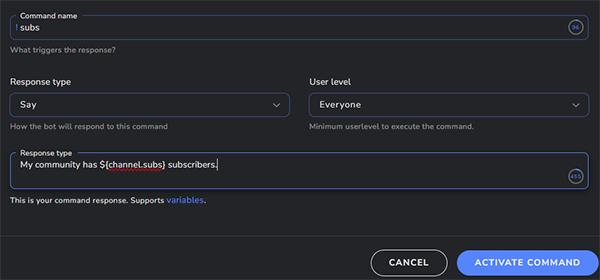
This is a simple command chat can use to see how many subscribers you currently have.
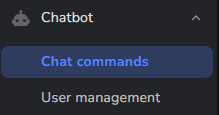
Navigate to your chat bot custom commands, click Add New Command.
Name the command “subs” and the Response type:
My community has ${channel.subs} subscribers.
Customize this message, keeping the variable that will display the total number. Click Activate Command.
Any time someone in chat users “!subs” it will respond with your message and total subscriber count!
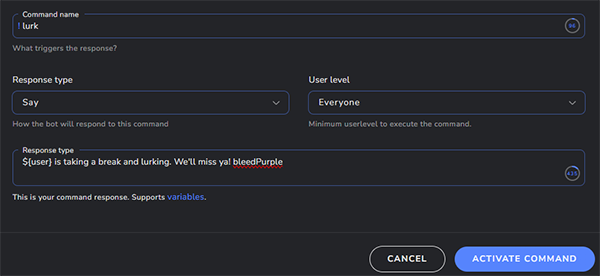
I’m going to show you how to create a simple !lurk command for your chat to use!
Navigate to your custom commands:
Name your command lurk, and the Response is as follows:
${user} is taking a break, and lurking. We'll miss ya! bleedPurple
Of course customize the message to what ever you may, keeping in mind the ${user} variable is the chatters name who used the command.
This is the output of the above command!
In this tutorial you will learn how to do a “wins” counter, complete with a “set” command and “reset” command!
We’re going to navigate to Chatbot > Commands > Custom Commands and click Add New Command.
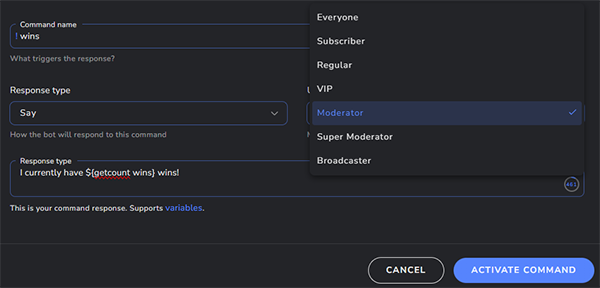
We’re going to name the command “wins“, set the User Level to Moderator so not just any one can use our command, and use the following Response:
I currently have ${getcount wins} wins!
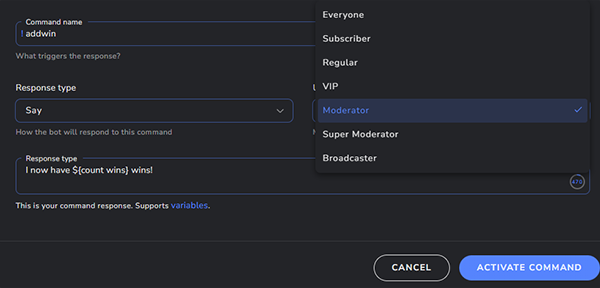
Now we need a command to add a win to the “wins” counter, so it will look something like this and will increase the number by 1. Add New Command, name the command “addwin“, set the User Level to Moderator, and Response type to:
I now have ${count wins} wins!
Type “!addwin” in your chat to set this to 1 and also create the “wins” counter. You can customize these commands to do what ever you please: win counter, death counter, etc. The word “wins” after “getcount” and “count” will be what ever you want your counter name to be, just make sure they match so they are talking to the same one.
Do you have numerous wins and would like the counter to start there?
You can set the counter to any number using the following command. Name the command “setwins“, User Level to Moderator, and the Response type below.
Wins now set to: ${count wins ${1}}
Type “!setwins 15” in your chat (15 being how many wins you actually have) and the counter will be set.
Are you wanting to reset this to 0 each stream?
You can reset the counter to 0 (zero) at any time by creating a reset command. Add New Command, name the command “resetwins“, User Level to Moderator, and Response type to:
Wins have been reset to ${count wins 0}
You can customize these commands to any thing you would like, keeping in mind the name of the counter inside the variable so everything is communicating with the same one!
I’ve been poking around at getting things setup the way I would like them to look, and so far have added 6 webcam packages that are entirely free to download and use. There will be more coming as well as panels, scenes, etc.
Starting after Christmas I’ll be putting in some tutorials for various chatbots, and begin working towards new content.
Happy holidays, enjoy!